Dec 15, 2014

Create Search Help in ABAP for Web Dynpro Component

This ABAP tutorial shows how to create search help and use it in Web Dynpro component for a context node attribute. First developers create Search Help in ABAP Data Dictionary using SE80 then assign Search Help to context node attribute using Input Help Mode and Dictionary Search Help properties in SAP Web Dynpro component.

This ABAP tutorial is formed of two sub-headings. First part in this tutorial shows how ABAP developers can create a search help in ABAP DATA Dictionary. The second section of the tutorial is dealing with how Web Dynpro developers can use this search help for a context node attribute.


Create Search Help in Data Dictionary

Call transaction SE80 Object Navigator. In Transport Organizer tab select Package from drop down list. Find your target package where you want to create your search help data dictionary object.


Right click on Dictionary Objects Context menu Create > Search Help


Type Search Help name. Leave Elementary search help as selected option.


Search Help create screen to define a new one


Type a short description. On Definition tab, type the master lookup table name at Selection method input textbox. Click on the first empty parameter line Search help parameter cell. Press F4 for possible entries or click on the F4 icon displayed when you click on the cell.


Double click on the field name you want to export to input text which is dislaying this search help. Mark the search help parameter as export.

Add all other desired fields but mark this time as import parameters

Enter the position number you want to see the field values in hit list using the LPos entery field. If you try to activate Search Help without hit list, you will get an error preventing the successfull activation of Search Help data dictionary object. Position in the hit list of an elementary search help Position of the parameter in the hit list.
Save and activate

Use Search Help in Web Dynpro Component for a Context Field

If you are going to use this Search Help on a Web Dynpro component, open component controller. Go to Context tab. Drill down the context node until you find the target field. Open properties of the attribute. There is a dropdown box at Input Help Mode property. You will see Dictionary Search Help. Change it from Automatic which is default to Dictionary Search Help.


Then enter the name of the Search Help data dictionary object which we have created in previous steps into the "Dictionary Search Help" property.


Save and activate your web dynpro component.
Here is the Search Help in action on a Web Dynpro web page.

Sep 30, 2014

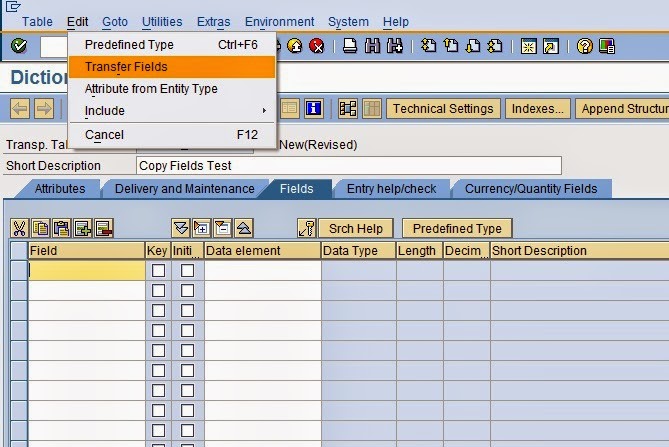
Copying Fields from other Structures or Tables


1.  Create table / structure name. As an example below is table name


2.  Choose from menu: Edit -> Transfer Fields


3.  Input structure name and press ‘Selection’.

4.  Select the fields and press Copy


5.  Paste the fields from Cipboard:


6.  All fields copied:


Sep 29, 2014

Create and Delete Folder in Frontend system using Class CL_GUI_FRONTEND_SERVICES

Procedure:
  1. Create Selection Screen with two radio buttons “Create Folder” and “Delete Folder”. And parameters to specify path for creating and deleting the folder.
  2. Give path and folder name in the selection screen
  3. Creating folder select the “Create Folder” Radio Button
  4. Deleting folder select the “Delete Folder” Radio Button  

Creation Process:


Deletion Process:


ABAP Codes:

*&----------------------------------------------------------------*
*& Report  Z_TEST001
*&
*&----------------------------------------------------------------*
*&
*&
*&----------------------------------------------------------------*

REPORT z_test001.

* Selection Screen Declarations
SELECTION-SCREEN BEGIN OF BLOCK b1 WITH FRAME TITLE text-001.
PARAMETERS: p_cr RADIOBUTTON GROUP rgb1 USER-COMMAND uco
                                    MODIF ID mod DEFAULT 'X',
            p_dr RADIOBUTTON GROUP rgb1 MODIF ID mod,
            p_cdir TYPE string,
            p_ddir TYPE string.
SELECTION-SCREEN END OF BLOCK b1.

* Data declarations
DATA: result TYPE char1,
      rc TYPE i,
      stripped_name TYPE string,
      v_string TYPE string.

************************************
* At Selection-Screen Output Event
************************************

AT SELECTION-SCREEN OUTPUT.

* Create Folder Checkbox Checked, Don’t display 
* the “Path to Delete Folder” parameter
  IF p_cr = 'X'.
    LOOP AT SCREEN.
      IF screen-name = 'P_DDIR' OR
        screen-name = '%_P_DDIR_%_APP_%-TEXT'.
        screen-input = 0.
        screen-invisible = 1.
        MODIFY SCREEN.
      ENDIF.
    ENDLOOP.
  ELSE.

* Delete Folder Checkbox Checked, Don’t display the 
* “Path to Create Folder” parameter
    LOOP AT SCREEN.
      IF screen-name = 'P_CDIR' OR
        screen-name = '%_P_CDIR_%_APP_%-TEXT'.
        screen-input = 0.
        screen-invisible = 1.
        MODIFY SCREEN.
      ENDIF.
    ENDLOOP.
  ENDIF.

************************************
* Start of Selection Event
************************************
START-OF-SELECTION.

  IF p_cr = 'X'.
    "create folder radio button is checked.

*   Clear result variable
    CLEAR result.

*     Get the folder name
    CALL FUNCTION 'SO_SPLIT_FILE_AND_PATH'
      EXPORTING
        full_name     = p_cdir
      IMPORTING
        stripped_name = stripped_name
      EXCEPTIONS
        x_error       = 1
        OTHERS        = 2.

*   Check if the folder name exists under the specified
*   directory which you want to create
    CALL METHOD cl_gui_frontend_services=>directory_exist
      EXPORTING
        directory            = p_cdir
      RECEIVING
        result               = result
      EXCEPTIONS
        cntl_error           = 1
        error_no_gui         = 2
        wrong_parameter      = 3
        not_supported_by_gui = 4
        OTHERS               = 5.

*   If the folder name already exists then display a message.
    IF result = 'X'.

      CLEAR v_string.
      CONCATENATE 'ALREADY CONTAINS A FOLDER NAMED'
                  stripped_name
                  INTO v_string SEPARATED BY space.

      MESSAGE v_string TYPE 'I'.
      LEAVE LIST-PROCESSING.

*   If the folder name is not exist in the specified directory
    ELSE.

*     Clear return code
      CLEAR rc.

*     Create a new folder under the specified directory
      CALL METHOD cl_gui_frontend_services=>directory_create
        EXPORTING
          directory                = p_cdir
        CHANGING
          rc                       = rc
        EXCEPTIONS
          directory_create_failed  = 1
          cntl_error               = 2
          error_no_gui             = 3
          directory_access_denied  = 4
          directory_already_exists = 5
          path_not_found           = 6
          unknown_error            = 7
          not_supported_by_gui     = 8
          wrong_parameter          = 9
          OTHERS                   = 10.

      IF rc = 0.
        CLEAR v_string.
        CONCATENATE 'CREATED FOLDER NAMED'
                    stripped_name
                    INTO v_string SEPARATED BY space.

        MESSAGE v_string TYPE 'I'.
      ENDIF.

    ENDIF.

  ELSE.  "Delete folder radio button is checked.

*   Clear result variable
    CLEAR result.

*   Get the folder name
    CALL FUNCTION 'SO_SPLIT_FILE_AND_PATH'
      EXPORTING
        full_name     = p_ddir
      IMPORTING
        stripped_name = stripped_name
      EXCEPTIONS
        x_error       = 1
        OTHERS        = 2.

*   Check if the folder name exists under the specified
*   directory which you want to create
    CALL METHOD cl_gui_frontend_services=>directory_exist
      EXPORTING
        directory            = p_ddir
      RECEIVING
        result               = result
      EXCEPTIONS
        cntl_error           = 1
        error_no_gui         = 2
        wrong_parameter      = 3
        not_supported_by_gui = 4
        OTHERS               = 5.

    IF result <> 'X'.

      CLEAR v_string.

      CONCATENATE 'THERE IS NO FOLDER NAMED'
                  stripped_name
                  INTO v_string SEPARATED BY space.

      MESSAGE v_string TYPE 'I'.
      LEAVE LIST-PROCESSING.

*   If the folder name exist, delete that folder from the
*   specified directory
    ELSE.

*     Clear return code
      CLEAR rc.

*      Delete folder from the specified directory
      CALL METHOD cl_gui_frontend_services=>directory_delete
        EXPORTING
          directory               = p_ddir
        CHANGING
          rc                      = rc
        EXCEPTIONS
          directory_delete_failed = 1
          cntl_error              = 2
          error_no_gui            = 3
          path_not_found          = 4
          directory_access_denied = 5
          unknown_error           = 6
          not_supported_by_gui    = 7
          wrong_parameter         = 8
          OTHERS                  = 9.
      IF rc = 0.
        CLEAR v_string.

        CONCATENATE 'DELETED FOLDER NAMED'
                    stripped_name
                    INTO v_string SEPARATED BY space.

        MESSAGE v_string TYPE 'I'.
        LEAVE LIST-PROCESSING.

      ENDIF.
    ENDIF.
  ENDIF.